SwipeMyJob applies to jobs for you. Set up once, swipe through jobs picked for you, and a swipe right sends your application on the employer's own form. Say goodbye to long forms.
Nothing is sent without your swipe. AI answers need your approval.
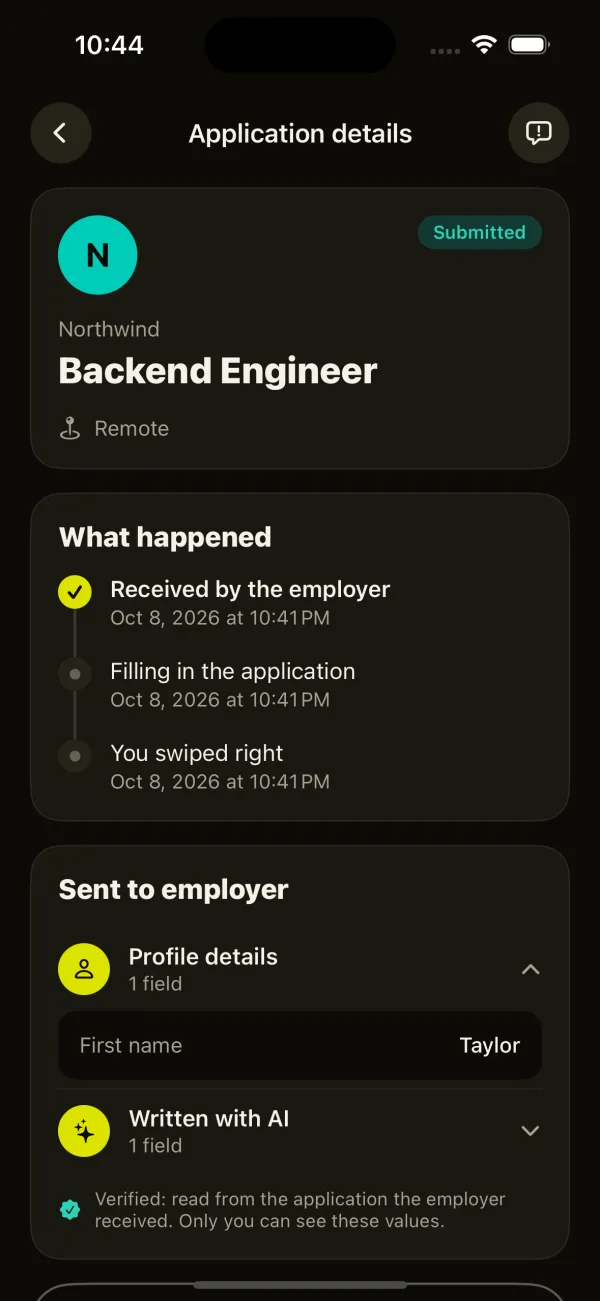
Submitted · Backend Engineer
92%match for you
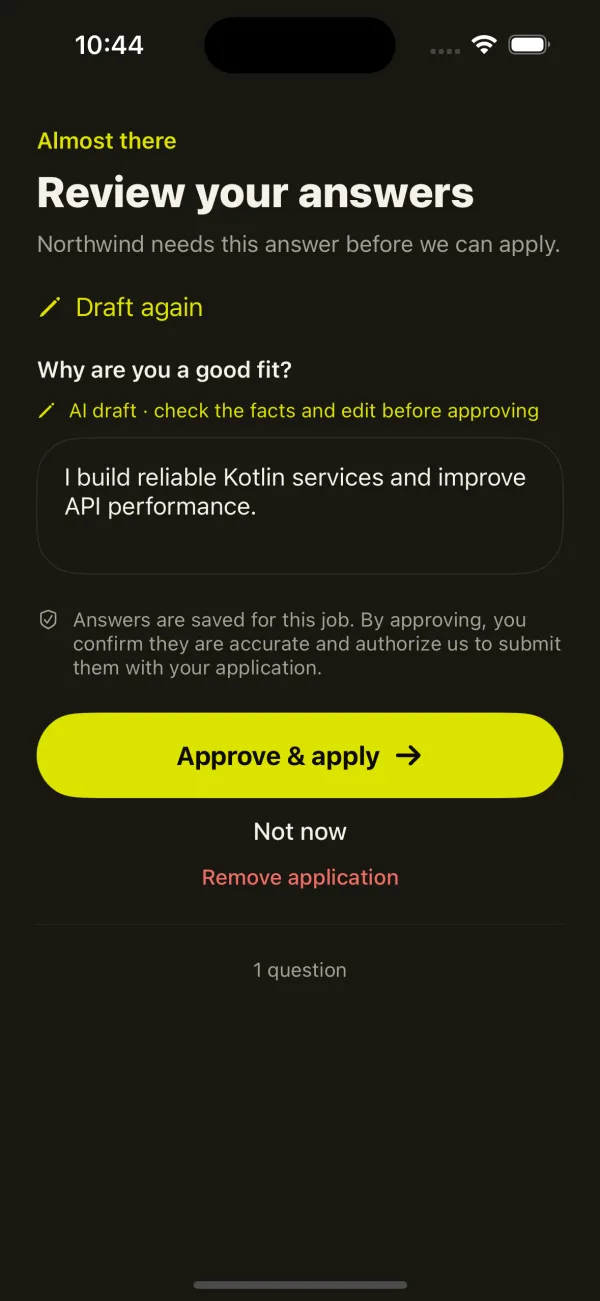
✍️ AI draft ready to review
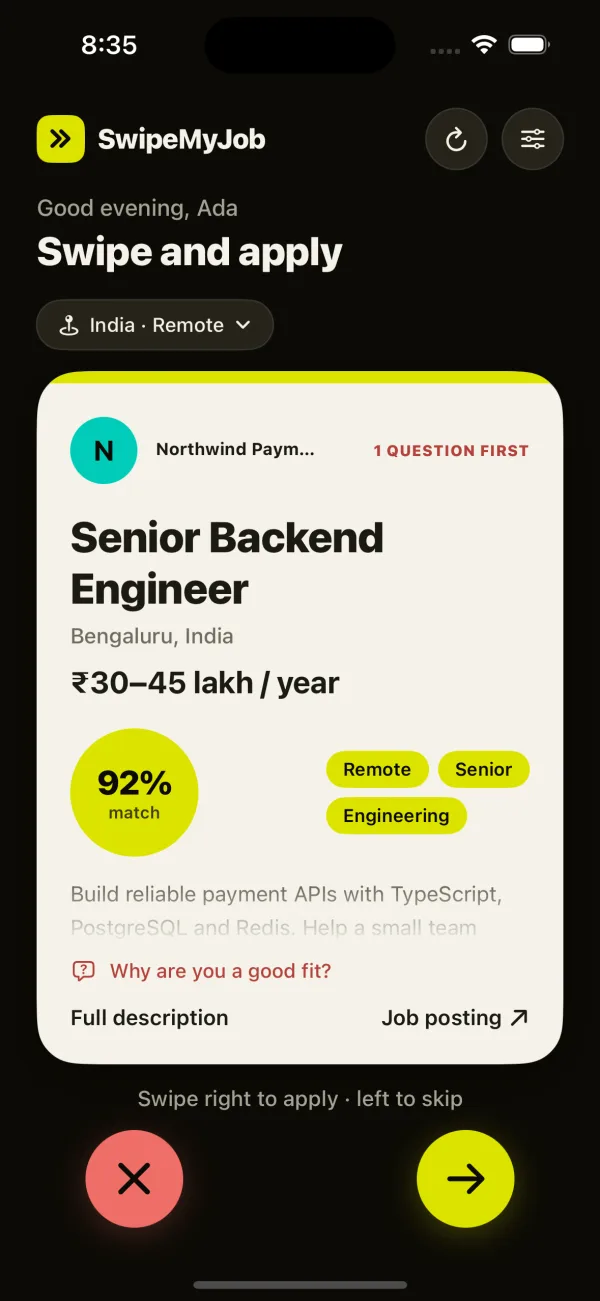
SwipeMyJob
Good evening, Ada
Swipe and apply
Your countries · Remote ⌄
NNorthwind Payments1 QUESTION FIRST
Senior Backend Engineer
Bengaluru, India
₹30–45 lakh / year
92%match
RemoteSeniorEngineering
Build reliable payment APIs with TypeScript, PostgreSQL and Redis. Help a small team ship fast, own services end to end and improve how payments scale across India.
Full descriptionJob posting ↗
Swipe right to apply · left to skip
One swipe applySay goodbye to long formsPersonalized jobsTailored AI answers & resumeBuilt for iPhone & AndroidOne swipe applySay goodbye to long formsPersonalized jobsTailored AI answers & resumeBuilt for iPhone & Android
Why SwipeMyJob
Job hunting, minus the busywork.
The average job application takes many minutes of copying the same details into yet another form. SwipeMyJob does that part, so you can apply to more of the right jobs and give each one your best shot.
One swipe apply
Swipe right. You've applied.
When your profile already covers everything a form asks, the job says One swipe apply. Swipe right and SwipeMyJob fills in and submits the employer's own application form for you, in the background.
Apply
No long forms
Say goodbye to long forms.
Enter your details once. Every application after that is filled in for you, so you never retype them.
Name, email & phoneProfile
Resume, tailored to the jobAI
LinkedIn & linksProfile
Work authorizationProfile
Why are you a good fit?AI draft
Application submitted
Personalized jobs
Jobs picked for you, not for everyone.
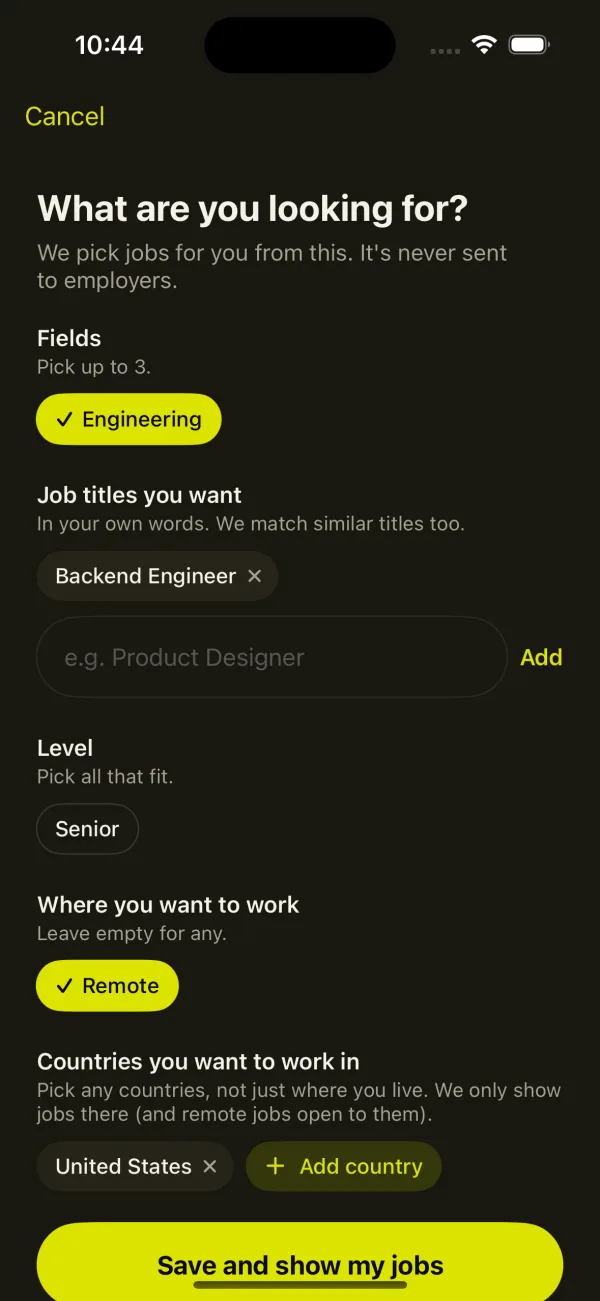
Tell us your fields, the titles you want, your level, remote or on-site, and the countries you want to work in. Every job shows how well it matches you.
92%match
✓ EngineeringBackend Engineer✓ RemoteSeniorUnited States
Tailored by AI
Your answers and resume, tailored to every job.
"Why do you want to work here?" "Why are you a good fit?" SwipeMyJob uses AI to tailor your resume and draft each answer from your experience, your skills and that job's description, to give every application the best chance of an interview. You check, edit and approve before anything is sent.
Why are you a good fit?
AI draft · check the facts and edit before approving
I've spent five years building payment APIs in TypeScript and PostgreSQL, most recently cutting checkout latency by 40%. Your focus on reliable, fast-moving infrastructure is exactly the work I do best.
Approve & apply
Drafts are never sent until you approve them.
How it works
From resume to applied in three steps.
Set up once
Upload your resume (PDF). We read your details for you to confirm, then you choose what you're looking for and answer work-authorization questions once.
Swipe jobs matched to you
One card at a time: role, pay, location, match score, and whether it's one swipe apply or needs a question first. Swipe left to skip; it never comes back.
Swipe right to apply
We fill in and submit the employer's own application form, then track it for you, with a receipt of exactly what the employer received.
Inside the app
Everything after the swipe, handled.
Questions first
Only asked what we can't answer.
If a form asks something your profile doesn't cover, the job says how many questions come first. Answer them once in the app; written answers start as AI drafts tailored to the job.
Edit, draft again, or write your own
Nothing is guessed: unknown answers are always asked
Demographic questions use "decline to answer"
Track every application
See exactly what was sent.
The Applications tab shows each application's status (Applying, Submitted, Needs your answer, Code needed) with a timeline and a receipt read from the application the employer actually received.
Never a duplicate application to the same job
Only you can see the values you sent
Security codes
Employer sent a code? Paste it, done.
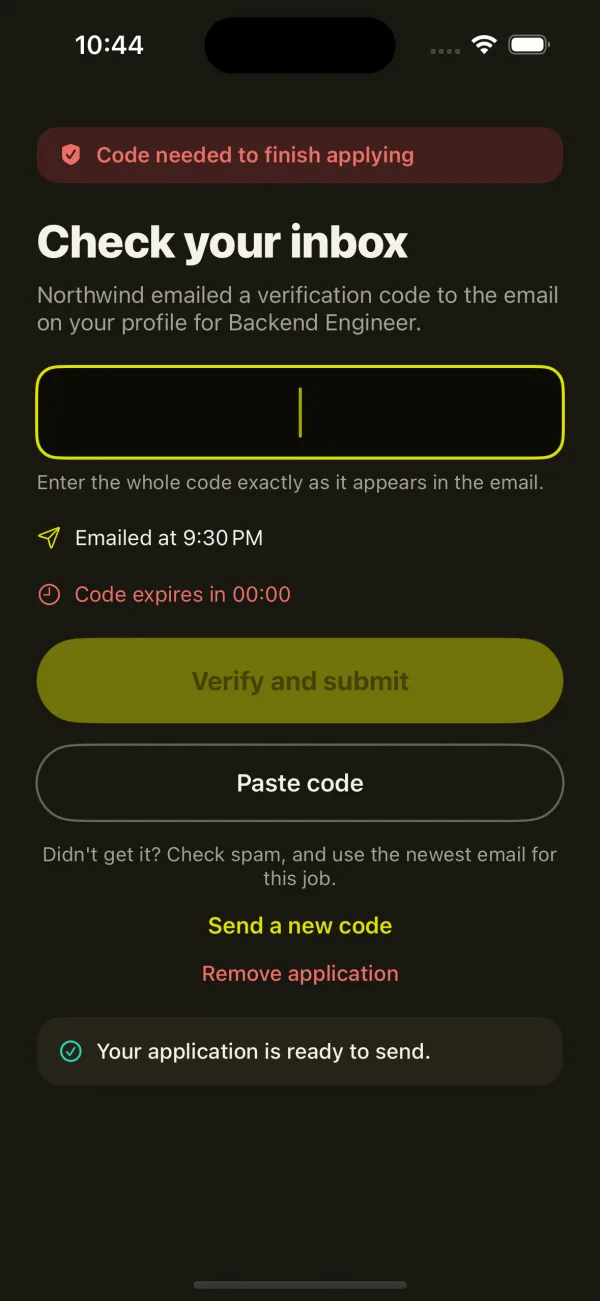
Some application forms email you a verification code. You get a notification, paste the code in the app, and SwipeMyJob finishes the application.
Personalized feed
Your fields. Your titles. Your countries.
Pick up to three fields, the titles you want in your own words, every level that fits, remote or on-site, and any countries you want to work in. One-swipe jobs come first.
You're in control
Correct data or nothing.
An application goes out under your name, so we treat every one like it matters.
Your swipe, your choice
Nothing is sent until you swipe right or tap Apply on that specific job.
AI you approve
AI drafts are suggestions. You review and approve every one before it's sent.
Real receipts
See exactly what each employer received, read from the application itself.
Your data stays yours
Never sold, never used for ads. Download or delete everything from Settings.
FAQ
Questions, answered.
What is SwipeMyJob?
SwipeMyJob is a mobile app for iPhone and Android that applies to jobs for you. You set up your profile and resume once, swipe through jobs matched to you, and a swipe right submits a real application to the employer's own application form under your name.
Is there an app that fills out job applications for me?
Yes: that's exactly what SwipeMyJob does. It fills in each employer's application form from your profile and resume and submits it when you swipe right. If a form asks something your profile can't answer, the app asks you first, and AI can draft written answers for you to review.
How can I apply to more jobs in less time?
Stop retyping the same details into every form. With SwipeMyJob you enter them once; after that, applying to a job you like is one swipe. Spend the time you save choosing the right roles, networking and preparing for interviews. More tips in our guide to applying to jobs faster.
Does SwipeMyJob send applications without my approval?
No. Nothing is sent until you swipe right or tap Apply on a specific job. AI-drafted answers are never sent until you review and approve them, and demographic questions are answered with "decline to answer".
How does SwipeMyJob tailor my answers and resume?
SwipeMyJob uses AI to tailor your resume and your answers to each job, to give every application the best chance of an interview. For written questions such as "Why are you a good fit?", it drafts an answer from your experience, your skills and the job description. You can edit it, draft again, or write your own, and nothing is sent until you approve it.
Which jobs can I apply to?
Thousands of open roles at leading companies, mostly in tech: engineering, design, product, data and more, including remote jobs. You choose your fields, titles, level, work style and the countries you want to work in.
Is SwipeMyJob free?
SwipeMyJob is free to start. An optional Premium subscription adds more applications each month; the app shows the price for your country before you subscribe, and a swipe only counts when an application is actually sent.
Is it on iPhone and Android?
Yes, SwipeMyJob is built for both iPhone (iOS) and Android. See the download page for the latest availability.
What happens when an employer emails a security code?
Some application forms email you a verification code before accepting an application. SwipeMyJob sends you a notification, you type or paste the code in the app, and it finishes the application.
Is my data safe? Do you sell it?
We never sell your data or use it for advertising. Your details are only sent to the employers you choose to apply to. You can download all your data or delete your account at any time. Read our privacy policy.
Stop filling forms. Start getting interviews.
Set up once in a few minutes. Then every job you like is one swipe away.